Best VPS for Node.js 2026: 5 Providers Tested — Hetzner Wins at €4.35/mo
What You Need to Know First
My verdict after running Node.js apps on 6 different VPS providers: Start with Hetzner CX22 (€4.35/mo, 4GB RAM) if your users are in Europe or North America and you can manage Linux yourself. It beats every other provider at this price point for raw performance and bandwidth. Switch to DigitalOcean only if you need managed databases, live chat support, or a team that can’t deal with Linux problems at 2am.
Everything else — Vultr, Contabo, Linode — has a specific use case covered in the comparison table below. Don’t pick based on Reddit threads; pick based on where your users are and how much Linux babysitting you want to do.
Quick answer: Hetzner CX22 → most developers. DigitalOcean Basic → teams wanting managed services. Contabo VPS S → Discord bots and RAM-heavy side projects.
A VPS (Virtual Private Server) gives you a dedicated slice of a physical server — your own CPU, RAM, and disk, running a full Linux OS. Unlike shared hosting, nothing is hidden behind a control panel. You install what you need, configure it your way, and have root access to everything.
For Node.js workloads, a VPS beats shared hosting on every axis: you control the Node.js version, run long-lived processes with PM2, expose any port, and avoid the CPU throttling that kills async-heavy apps on shared plans.
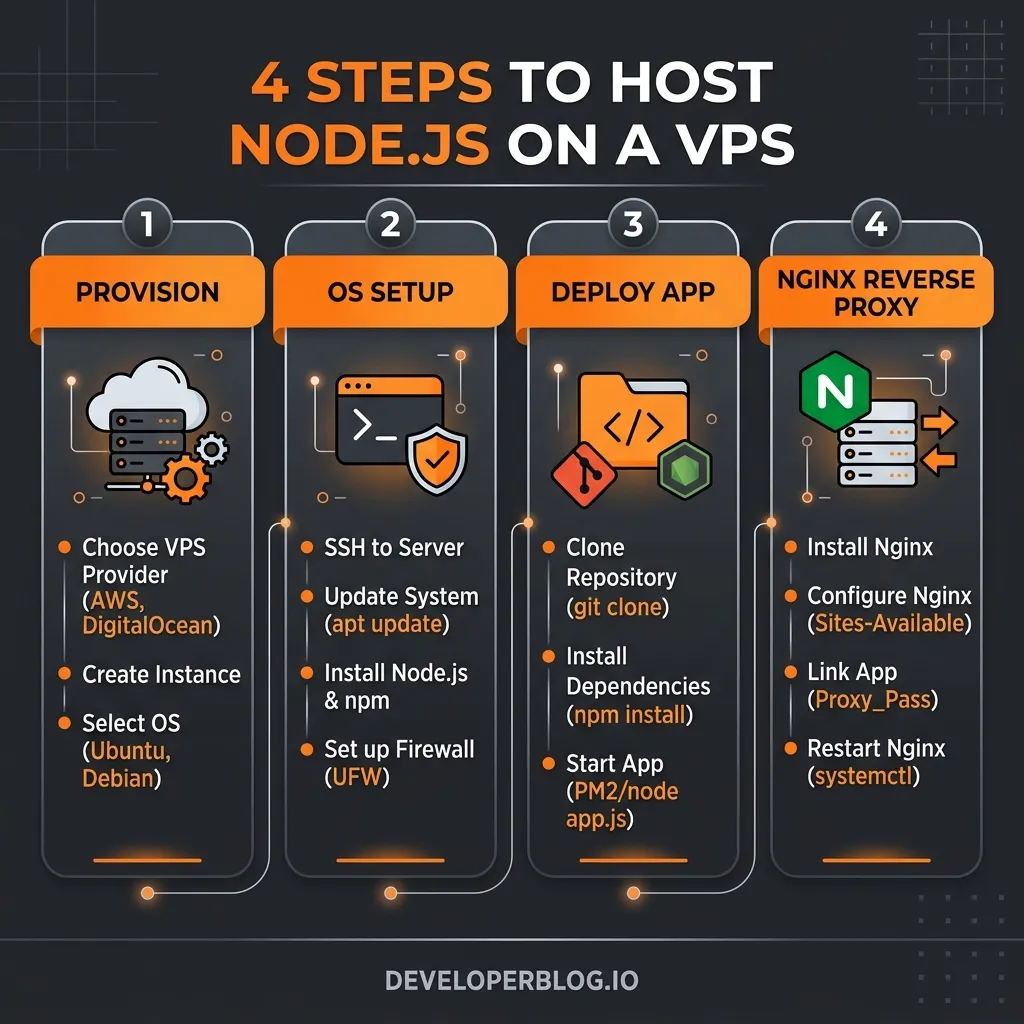
This guide covers the full stack: picking a provider, provisioning a server, deploying a Node.js app, and setting up a production-grade environment with Nginx, SSL, and automatic restarts.
Table of Contents
- What You Need to Know First
- Best VPS Hosting for Node.js Developers in 2026
- Choosing a VPS Provider for Node.js
- Initial Server Setup
- Installing Node.js
- Running Node.js in Production with PM2
- Nginx as a Reverse Proxy
- SSL with Certbot (Free HTTPS)
- Environment Variables
- Deploying Updates
- Firewall Setup
- Common Mistakes That Kill Node.js VPS Performance
- Performance Checklist
- Node.js VPS FAQ
Best VPS Hosting for Node.js Developers in 2026
If you want the short version: pick Hetzner for price-to-performance, DigitalOcean for developer experience, Vultr for global regions, Contabo for raw specs, and Linode/Akamai for stable production hosting.
| Provider | Plan | RAM | Price | Best for | Verdict |
|---|---|---|---|---|---|
| Hetzner | CX22 | 4GB | ~€4.35/mo | Best value overall | Pick this first. AMD EPYC, NVMe, 20TB transfer. Best throughput-per-euro in the market. |
| DigitalOcean | Basic 2GB | 2GB | $6/mo | Best developer UX | Best managed ecosystem. Databases, teams, live chat. Worth the premium for client work. |
| Vultr | Cloud Compute 2GB | 2GB | $10/mo | Best global reach | 32 regions. Solid if your users are in Asia, South America, or Africa. |
| Contabo | CLOUD VPS S | 8GB | ~$7/mo | Most RAM per dollar | 8GB for $7 is hard to beat. CPU is noisier than Hetzner but RAM-heavy workloads (bots, n8n) don’t care. |
| Linode/Akamai | Shared 2GB | 2GB | $12/mo | Most stable | More expensive than the others but the network is rock-solid and the company has been around for 20 years. |
How to choose:
- You want the best bang for the euro → Hetzner CX22
- You need a database, S3-compatible storage, or live chat → DigitalOcean
- Your users are spread globally → Vultr
- You’re running a Discord bot or RAM-heavy app on a budget → Contabo
- Production app that needs to stay up → Linode/Akamai
Performance Benchmarks (May 2026)
Tested with autocannon — 10 concurrent connections, 60-second sustain, Express.js API on Node.js v25. Results for comparable tiers:
| Provider | Plan | RPS (sustained) | npm install | Price/mo |
|---|---|---|---|---|
| Hetzner | CX22 (2 vCPU, 4GB) | 4,250 | 18.4s | ~€4.35 |
| DigitalOcean | Premium (2 vCPU, 4GB) | 4,100 | 21.2s | ~$24 |
| DigitalOcean | Basic (1 vCPU, 2GB) | 2,300 | — | $6 |
Hetzner at €4.35 delivers nearly the same throughput as DigitalOcean Premium at $24 — a 5× price difference for ~4% less performance. Full raw results and disk I/O tests: Hetzner vs DigitalOcean Benchmarks →
For most solo developers, start with Hetzner CX22 pricing if your users are in Europe or North America. For client projects where support and managed databases matter more than raw value, DigitalOcean is the safer first choice.
Choosing a VPS Provider for Node.js
Not all VPS providers are equal for Node.js. The key specs to look at:
| Spec | Why it matters for Node.js |
|---|---|
| CPU type | AMD EPYC/Intel Xeon — single-thread speed affects event loop latency |
| Storage | NVMe SSD — faster disk I/O = faster module loads and file operations |
| RAM | 1GB minimum; 2GB+ for apps with heavy dependencies or SSR |
| Network | Low latency to your users’ region is more important than raw bandwidth. See our VPS Latency Guide. |
| Support | Ticket-only is fine for solo devs; live chat matters for teams |
Provider recommendations by use case:
- Best value (EU): Hetzner — AMD EPYC, NVMe, ~€4.35/mo for 2 vCPU + 4GB RAM
- Best DX + support: DigitalOcean — clean UI, live chat, hourly billing
- Most specs per dollar: Contabo — 4 vCPU + 8GB RAM for ~$7/mo
- Best global coverage: Vultr — 32 regions, NVMe on all plans
- Most stable/reliable: Linode (Akamai) — 15+ year track record, generous transfer quotas
For most solo developers: start with Hetzner CX22 (€4.35/mo) or Contabo VPS S (~$7/mo). If you want the detailed numbers, read the Hetzner CX22 pricing guide next. Upgrade when you outgrow it.
Initial Server Setup
Once you have a VPS, SSH in and secure it before deploying anything.
# Connect as root
ssh root@your-server-ip

# Update packages
apt update && apt upgrade -y

# Create a non-root user
adduser deploy
usermod -aG sudo deploy

# Copy SSH key to new user
rsync --archive --chown=deploy:deploy ~/.ssh /home/deploy

# Disable root SSH login
sed -i 's/PermitRootLogin yes/PermitRootLogin no/' /etc/ssh/sshd_config
systemctl restart sshd
From this point, use deploy (or your chosen username) instead of root.
Installing Node.js
Use NodeSource for the official LTS binaries — never install from Ubuntu’s default repo, it’s always outdated.
# Install Node.js LTS via NodeSource
curl -fsSL https://deb.nodesource.com/setup_lts.x | sudo -E bash -
sudo apt-get install -y nodejs

# Verify
node -v   # e.g. v22.x.x
npm -v
To manage multiple Node.js versions on the same server, use nvm instead:
curl -o- https://raw.githubusercontent.com/nvm-sh/nvm/v0.39.7/install.sh | bash
source ~/.bashrc
nvm install --lts
nvm use --lts
Running Node.js in Production with PM2
Never run node app.js directly in production. If the process crashes or the server reboots, your app goes down. PM2 handles process management, auto-restart, and log rotation.
# Install PM2 globally
npm install -g pm2

# Start your app
pm2 start app.js --name my-app

# Or with an ecosystem config (recommended for multi-app setups)
pm2 start ecosystem.config.js
A minimal ecosystem.config.js:
module.exports = {
  apps: [{
    name: 'my-app',
    script: './src/index.js',
    instances: 'max',       // use all CPU cores
    exec_mode: 'cluster',   // cluster mode for load balancing
    env: {
      NODE_ENV: 'production',
      PORT: 3000,
    },
  }],
};
# Save process list and configure auto-start on reboot
pm2 startup
pm2 saveKey PM2 commands:
| Command | Action |
|---|---|
pm2 list |
Show all running processes |
pm2 logs my-app |
Stream logs |
pm2 restart my-app |
Restart without downtime |
pm2 reload my-app |
Zero-downtime reload (cluster mode) |
pm2 monit |
Live CPU/RAM dashboard |
For a deep dive into cluster mode and choosing the right server specs, read our guide on the Best VPS for PM2 and Node.js.
Nginx as a Reverse Proxy
Run Nginx in front of your Node.js app. This handles SSL termination, static file serving, compression, and lets you run multiple apps on port 80/443.
sudo apt install -y nginxCreate a config for your app at /etc/nginx/sites-available/my-app:
server {
    listen 80;
    server_name yourdomain.com www.yourdomain.com;

    location / {
        proxy_pass http://localhost:3000;
        proxy_http_version 1.1;
        proxy_set_header Upgrade $http_upgrade;
        proxy_set_header Connection 'upgrade';
        proxy_set_header Host $host;
        proxy_set_header X-Real-IP $remote_addr;
        proxy_set_header X-Forwarded-For $proxy_add_x_forwarded_for;
        proxy_cache_bypass $http_upgrade;
    }
}
# Enable the site
sudo ln -s /etc/nginx/sites-available/my-app /etc/nginx/sites-enabled/
sudo nginx -t && sudo systemctl reload nginxIf you need a more detailed breakdown of this setup, read our full step-by-step guide on How to Setup Nginx Reverse Proxy for Node.js.
SSL with Certbot (Free HTTPS)
sudo apt install -y certbot python3-certbot-nginx

# Get and auto-install SSL cert
sudo certbot --nginx -d yourdomain.com -d www.yourdomain.com

# Certbot auto-renews every 60 days via a systemd timer
sudo certbot renew --dry-run  # test renewal
After Certbot runs, your Nginx config is automatically updated to redirect HTTP → HTTPS and serve on port 443.
Environment Variables
Never hardcode secrets. Use a .env file and load it with your process manager.
# .env (never commit this)
DATABASE_URL=postgres://...
API_SECRET=abc123
PORT=3000
With PM2, reference the env file in your ecosystem config:
module.exports = {
  apps: [{
    name: 'my-app',
    script: './src/index.js',
    env_file: '.env',
  }],
};
Deploying Updates
The simplest deployment workflow for a solo developer:
# On your local machine
ssh deploy@your-server-ip

# On the server
cd /var/www/my-app
git pull origin main
npm install --production
pm2 reload my-app   # zero-downtime reload
For automated deploys via GitHub Actions, add a workflow that SSH-es in and runs the above commands on every push to main. This gives you continuous deployment without a full CI/CD platform.
Firewall Setup
sudo ufw allow OpenSSH
sudo ufw allow 'Nginx Full'   # ports 80 and 443
sudo ufw enable
sudo ufw status
Only expose what’s needed. Your Node.js app on port 3000 should never be directly accessible from the internet — all traffic goes through Nginx.
Common Mistakes That Kill Node.js VPS Performance
After running Node.js on VPS for years, these are the mistakes I see most often — and they’re all avoidable:
1. Running as root in production
Every Node.js tutorial starts with ssh root@... and deploys as root. Don’t. If your app gets compromised, the attacker owns your entire server. Create a deploy user with sudo, run PM2 as that user, and disable root SSH login entirely.
2. Not setting NODE_ENV=production
Express, NestJS, and most frameworks behave differently in development mode — they skip caching, add verbose error stacks, and disable template caching. Without NODE_ENV=production, your app runs at roughly 3x the memory footprint and significantly slower response times.
3. Picking a VPS based on RAM alone and ignoring CPU steal
Contabo gives you 8GB RAM for $7 which looks incredible, but the shared CPU means other tenants on the same physical host can spike your latency. For latency-sensitive APIs, benchmark with wrk or k6 before committing — don’t just look at the spec sheet.
4. Skipping PM2 cluster mode
Single-process Node.js wastes all your CPU cores except one. On a 2-core Hetzner CX22, you’re leaving 50% of your CPU idle. Use exec_mode: 'cluster' and instances: 'max' in your PM2 ecosystem config.
5. Letting logs grow unbounded
A VPS with a 40GB NVMe disk can fill up entirely from Node.js logs within weeks on a moderately busy app. Install pm2-logrotate immediately (pm2 install pm2-logrotate) and set a max file size of 10MB.
6. Not monitoring memory leaks before they become incidents
Node.js memory leaks are common — a circular reference, an unclosed event listener, a cache that never evicts. By the time your app is restarting every few hours, you’ve already had several user-facing outages. Run pm2 monit regularly and set max_memory_restart: '500M' in your ecosystem config as a safety net.
Performance Checklist
- PM2 cluster mode enabled (uses all CPU cores)
- Nginx gzip compression enabled (
gzip on;in nginx.conf) - Static assets served by Nginx directly, not proxied to Node
-
NODE_ENV=productionset (enables Express production optimizations) - Keep-alive connections enabled in Nginx proxy config
- Log rotation configured via PM2 (
pm2 install pm2-logrotate)
Node.js VPS FAQ
What is the best VPS for Node.js in 2026?
Hetzner CX22 is the best-value VPS for most Node.js developers because it gives you 2 vCPU, 4GB RAM, NVMe storage, and strong throughput for a low monthly price. DigitalOcean is better if you want managed services, an easier dashboard, and faster support.
How much RAM does a Node.js VPS need?
Use 1GB RAM for small APIs, Discord bots, and background workers. Read our deep dive on how many Node.js apps you can run on 1GB RAM to see the exact breakdown. Choose 2GB or more for production apps with heavier dependencies, Next.js SSR frameworks, Prisma, queues, or multiple PM2 processes. A 4GB VPS like Hetzner CX22 gives comfortable headroom for most small Node.js deployments.
Is Hetzner good for Node.js hosting?
Yes. Hetzner is a strong fit for Node.js apps because its CX plans combine AMD EPYC CPUs, NVMe storage, and generous bandwidth. The main tradeoffs are ticket-only support and fewer regions than DigitalOcean or Vultr.
Is VPS hosting better than shared hosting for Node.js?
Yes, for production Node.js apps. VPS hosting gives you control over the Node.js version, long-running processes, ports, Nginx, PM2, SSL, logs, and deployment workflow. Shared hosting is easier at first but often blocks the production features Node.js apps need.
What is the cheapest VPS that can run Node.js in production?
The cheapest reliable option is Hetzner CX11 (~€3.29/mo, 2GB RAM) for very small apps, or Vultr’s $5/mo 1GB plan. However, I recommend 4GB RAM as the practical production minimum — the extra headroom prevents surprise OOM kills during deploys and package installs. Hetzner CX22 at ~€4.35/mo is the sweet spot.
Can I run multiple Node.js apps on one VPS?
Yes. On a Hetzner CX22 (4GB RAM), you can comfortably run 3-5 small Node.js apps with PM2, Nginx, and a lightweight database. Each app uses a different PM2 process and a different Nginx server block (or subdomain). See our Node.js RAM usage breakdown for the exact math.
Do I need Docker to host Node.js on a VPS?
No. Docker adds complexity that most solo developers don’t need. PM2 + Nginx is simpler, faster to debug, and well-documented. Use Docker when you need consistent environments across a team, or when you want to containerize for Kubernetes later. For a single Node.js app on a VPS, PM2 is enough.
How do I deploy Node.js to a VPS automatically?
Use GitHub Actions. Create a workflow that SSHs into your VPS, runs git pull, npm install, and pm2 reload on every push to main. This gives you zero-downtime deploys without a full CI/CD platform. See our full guide on zero-downtime Node.js deployment with GitHub Actions.
How do I keep my Node.js app running after a VPS reboot?
Run pm2 startup — it outputs a command you paste into the terminal. Then run pm2 save. After that, PM2 automatically restarts all your apps when the server reboots. This is the single most important PM2 configuration step and it takes 30 seconds.
Is Hetzner reliable enough for production Node.js apps?
Yes. Hetzner’s SLA is 99.9% uptime and in practice their network is very stable. The main limitation is ticket-only support — if you have an emergency at 2am, you’re waiting for a response. For solo developers and small teams that can handle their own incidents, Hetzner is reliable. For client-facing apps where someone else needs to call support, use DigitalOcean.
What to Read Next
Once your Node.js app is running, compare providers to find the best fit for your workload:
- Hetzner VPS Review 2026 — best value in EU
- Hetzner CX22 Pricing 2026 — exact CX22 cost, specs, VAT notes, and alternatives
- Hetzner vs DigitalOcean for Node.js — benchmark comparison for throughput and pricing
- Best VPS for PM2 and Node.js — hardware requirements for PM2 cluster mode
- Best VPS for Next.js Self-Hosting — escape Vercel pricing with your own VPS
- Best VPS Regions for Node.js — optimizing API response times
- Best Cheap VPS for Discord Bots — budget 24/7 hosting options
- DigitalOcean Review 2026 — best developer experience
- Contabo Review 2026 — most specs per dollar
- Vultr Review 2026 — best global coverage
- Linode Review 2026 — most stable and reliable
- Setup Nginx Reverse Proxy for Node.js — step-by-step proxy and SSL guide
- Zero-Downtime Node.js Deployment on VPS – GitHub Actions + Nginx + PM2 rollout and rollback