Zero-Downtime Node.js Deploy on VPS: GitHub Actions + Nginx + PM2 (Rollback <60s)
Most Node.js teams do not lose uptime because of traffic spikes, they lose it during deploys. If your current flow is “SSH into VPS, pull latest code, restart app”, users will see intermittent errors every release.
This implementation-first tutorial gives you a proven zero downtime deployment node js vps workflow using release folders, atomic symlink switch, and PM2 cluster reload behind Nginx.
By the end, you will be able to:
- Deploy new releases without visible downtime
- Validate health before marking deploy as successful
- Roll back in under 60 seconds
Before starting, you may want to review:
- The Complete Guide to Hosting Node.js on a VPS in 2026
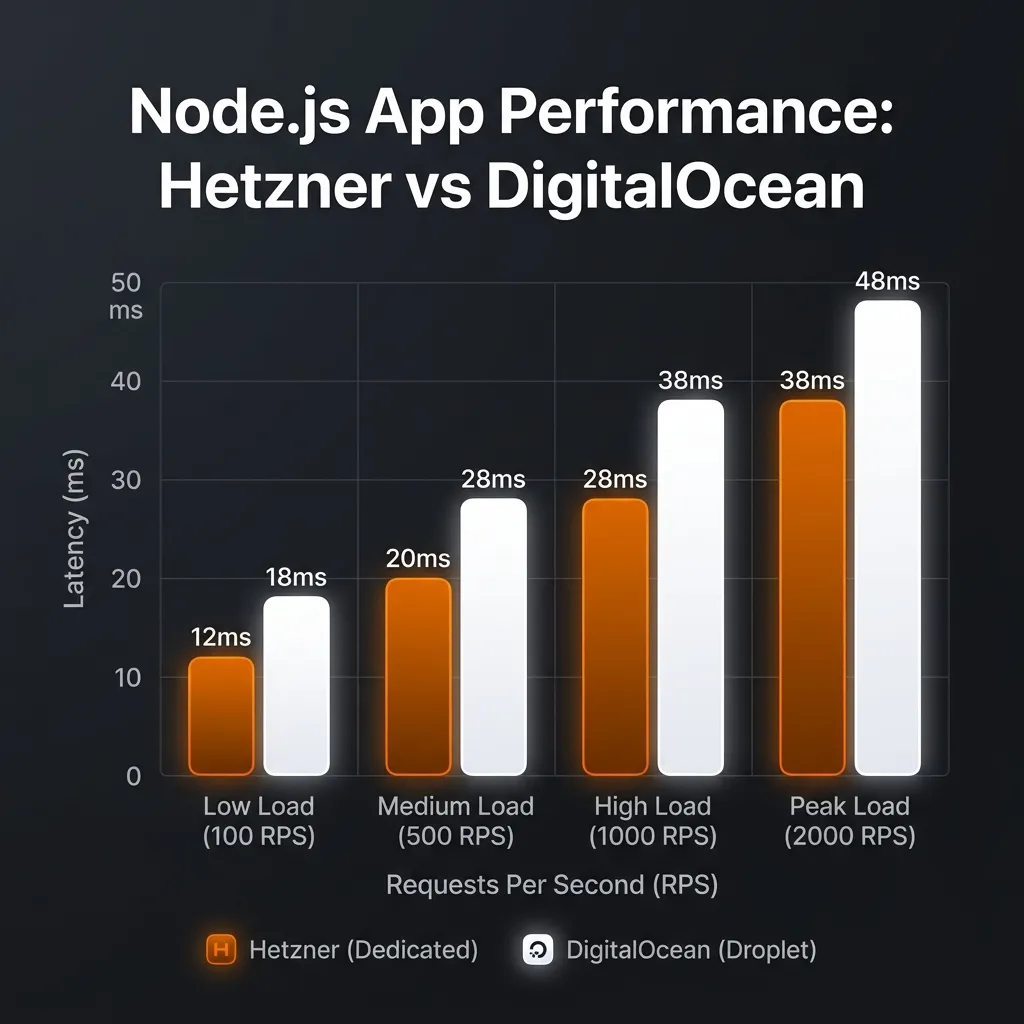
- Hetzner vs. DigitalOcean: Benchmarking Node.js Throughput in 2026
- Optimizing PM2 for High-Performance Node.js Clusters on Cheap VPS
Official references used in this tutorial:
- Node.js Documentation
- Nginx Reverse Proxy Guide
- PM2 Documentation
- GitHub Actions Documentation
- Google Search Console URL Inspection
Quick update for newly indexed sites
If your site is still new and Google is slow to index deploy guides, publish one meaningful refresh after launch (for example, add one troubleshooting case or one health-check detail) and then re-submit the URL in Search Console URL Inspection. This tutorial was refreshed with a stricter health-check verification path for that exact reason.
Why zero-downtime matters for Node.js on VPS
Deploy downtime is expensive even on small apps:
- API requests fail during process restart
- Webhooks (Discord/Telegram/Stripe) are dropped
- Users see intermittent 502/timeout errors
- Incident debugging becomes harder because deploy issues and runtime issues overlap
For most teams running one Node.js app per VPS, you do not need Kubernetes. A stable nginx reverse proxy nodejs + PM2 reload + release folders is enough to get production-grade deploy behavior.
Deployment architecture for zero downtime deployment node js vps
This is the exact runtime flow we implement:
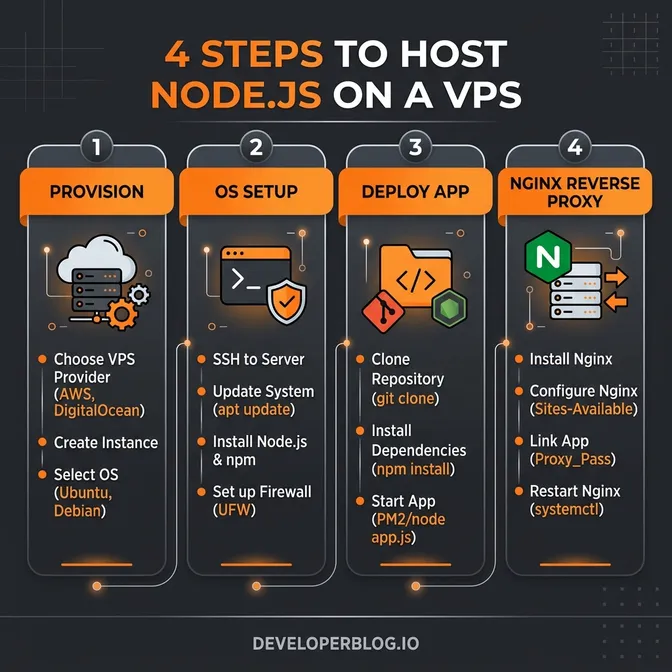
- Push to
maintriggersgithub actions nodejs deploy. - CI runs build + tests.
- CI uploads release package via SSH to VPS.
- VPS extracts package into
/var/www/myapp/releases/<release-id>. currentsymlink is switched atomically to new release.- PM2 runs graceful reload (
pm2 startOrReload). - Health check confirms deployment.
- If health fails, symlink is switched back and PM2 reloads previous release.
Traffic path stays stable throughout:
Client -> Nginx (443) -> Node.js app (127.0.0.1:3000) via PM2
Prerequisites
VPS and OS baseline
- Ubuntu 22.04+ VPS
- Domain already pointed to VPS
- Non-root user (example
deploy) - SSH key authentication enabled
- UFW configured for ports
22,80,443
Node.js app baseline
- Node.js 20+
- Build output ready (
npm run build) - Health endpoint (
/healthz) - PM2 ecosystem file committed in repo
Example ecosystem.config.cjs:
module.exports = {
  apps: [
    {
      name: "my-node-app",
      script: "dist/server.js",
      cwd: "/var/www/myapp/current",
      instances: "max",
      exec_mode: "cluster",
      wait_ready: true,
      listen_timeout: 10000,
      kill_timeout: 5000,
      env: {
        NODE_ENV: "production",
        PORT: 3000
      }
    }
  ]
};
GitHub repository secrets
Set these in repository Actions secrets:
VPS_HOSTVPS_USERVPS_PORTVPS_SSH_KEYAPP_DIR(example:/var/www/myapp)
Step 1: Prepare VPS release structure
Create deploy directories:
sudo mkdir -p /var/www/myapp/{releases,shared}
sudo chown -R deploy:deploy /var/www/myapp
Recommended structure:
/var/www/myapp
  ├── releases/
  │   ├── 20260422-120100/
  │   └── 20260422-143500/
  ├── shared/
  │   ├── .env
  │   └── logs/
  └── current -> /var/www/myapp/releases/20260422-143500
Why this works:
- Keeps every deploy versioned
- Makes rollback immediate
- Avoids half-updated working directories
Step 2: Configure Nginx reverse proxy (HTTPS redirect included)
Use this server block (replace domain and cert paths):
server {
    listen 80;
    listen [::]:80;
    server_name example.com www.example.com;
    return 301 https://$host$request_uri;
}

server {
    listen 443 ssl http2;
    listen [::]:443 ssl http2;
    server_name example.com www.example.com;

    ssl_certificate /etc/letsencrypt/live/example.com/fullchain.pem;
    ssl_certificate_key /etc/letsencrypt/live/example.com/privkey.pem;
    ssl_protocols TLSv1.2 TLSv1.3;

    location / {
        proxy_pass http://127.0.0.1:3000;
        proxy_http_version 1.1;
        proxy_set_header Host $host;
        proxy_set_header X-Real-IP $remote_addr;
        proxy_set_header X-Forwarded-For $proxy_add_x_forwarded_for;
        proxy_set_header X-Forwarded-Proto $scheme;
        proxy_set_header Upgrade $http_upgrade;
        proxy_set_header Connection "upgrade";
        proxy_connect_timeout 5s;
        proxy_send_timeout 60s;
        proxy_read_timeout 60s;
    }
}
Validate and reload:
sudo nginx -t && sudo systemctl reload nginxStep 3: GitHub Actions workflow for zero downtime deployment node js vps
Create .github/workflows/deploy.yml:
name: Deploy Node.js to VPS (Zero Downtime)

on:
  push:
    branches: [main]
  workflow_dispatch:

concurrency:
  group: production-deploy
  cancel-in-progress: false

jobs:
  deploy:
    runs-on: ubuntu-latest
    env:
      APP_DIR: ${{ secrets.APP_DIR }}
      RELEASE_NAME: ${{ github.run_number }}-${{ github.sha }}
    steps:
      - name: Checkout
        uses: actions/checkout@v4

      - name: Setup Node
        uses: actions/setup-node@v4
        with:
          node-version: 20
          cache: "npm"

      - name: Install dependencies
        run: npm ci

      - name: Run tests
        run: npm test

      - name: Build
        run: npm run build

      - name: Package release
        run: |
          mkdir -p release
          cp -r dist package.json package-lock.json ecosystem.config.cjs release/
          tar -czf release.tar.gz -C release .

      - name: Setup SSH
        run: |
          mkdir -p ~/.ssh
          echo "${{ secrets.VPS_SSH_KEY }}" > ~/.ssh/id_rsa
          chmod 600 ~/.ssh/id_rsa
          ssh-keyscan -p ${{ secrets.VPS_PORT }} -H ${{ secrets.VPS_HOST }} >> ~/.ssh/known_hosts

      - name: Upload release
        run: |
          scp -P ${{ secrets.VPS_PORT }} release.tar.gz \
            ${{ secrets.VPS_USER }}@${{ secrets.VPS_HOST }}:/tmp/release.tar.gz

      - name: Deploy and verify
        run: |
          ssh -p ${{ secrets.VPS_PORT }} ${{ secrets.VPS_USER }}@${{ secrets.VPS_HOST }} << 'EOF'
          set -euo pipefail

          APP_DIR="${APP_DIR}"
          RELEASE_DIR="$APP_DIR/releases/${RELEASE_NAME}"
          PREVIOUS_TARGET="$(readlink -f $APP_DIR/current || true)"

          mkdir -p "$RELEASE_DIR"
          tar -xzf /tmp/release.tar.gz -C "$RELEASE_DIR"
          cd "$RELEASE_DIR"
          npm ci --omit=dev

          ln -sfn "$APP_DIR/shared/.env" "$RELEASE_DIR/.env"
          ln -sfn "$RELEASE_DIR" "$APP_DIR/current"

          cd "$APP_DIR/current"
          pm2 startOrReload ecosystem.config.cjs --update-env
          pm2 save

          if ! curl -fsS --max-time 5 http://127.0.0.1:3000/healthz > /dev/null; then
            echo "Health check failed. Rolling back..."
            if [ -n "$PREVIOUS_TARGET" ]; then
              ln -sfn "$PREVIOUS_TARGET" "$APP_DIR/current"
              cd "$APP_DIR/current"
              pm2 startOrReload ecosystem.config.cjs --update-env
              pm2 save
            fi
            exit 1
          fi

          ls -1dt "$APP_DIR"/releases/* | tail -n +6 | xargs -r rm -rf
          rm -f /tmp/release.tar.gz
          EOF
Step 4: PM2 reload flow with health-check verification
For manual production reloads:
cd /var/www/myapp/current
pm2 startOrReload ecosystem.config.cjs --update-env
curl -fsS http://127.0.0.1:3000/healthz
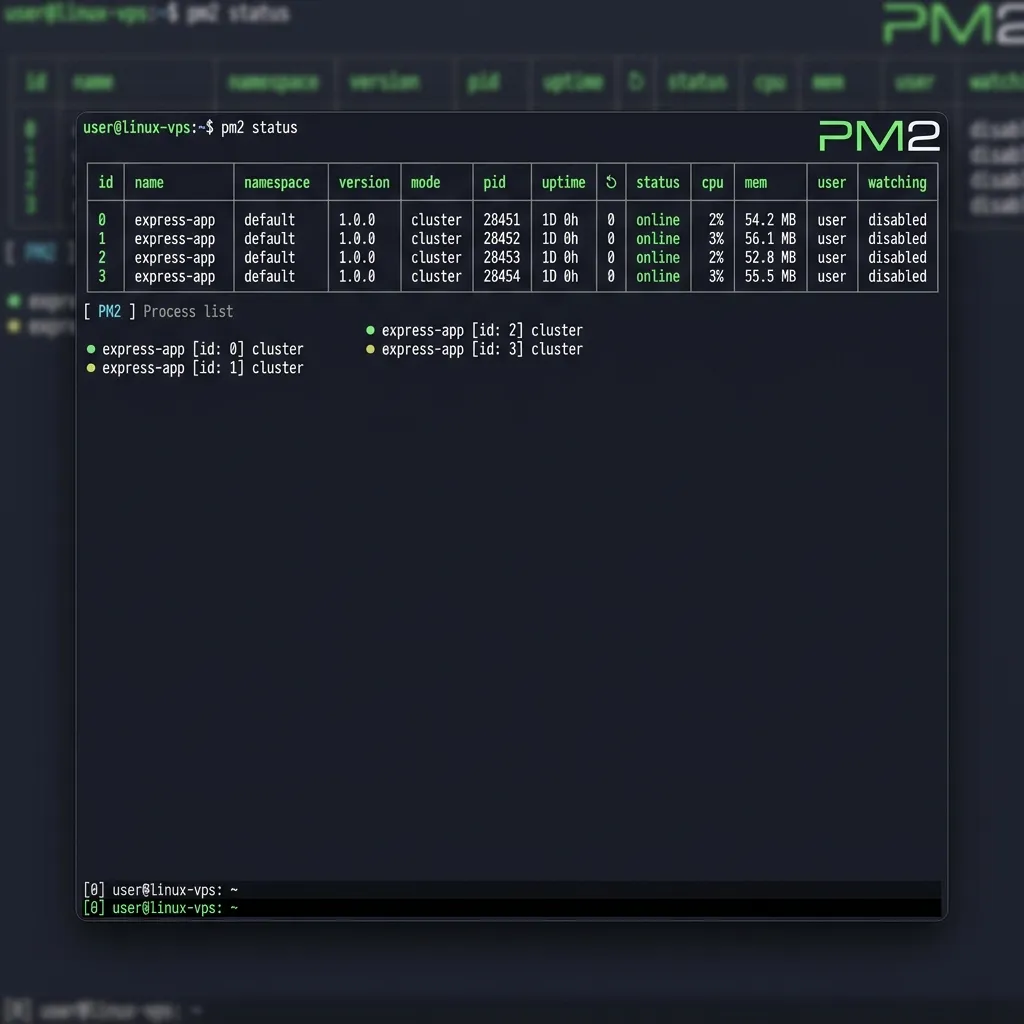
pm2 status
pm2 reload (or startOrReload) is preferred over pm2 restart for pm2 reload zero downtime behavior in cluster mode.
Rollback playbook (under 60 seconds)
If release health check fails:
APP_DIR=/var/www/myapp
PREVIOUS_RELEASE=$(ls -1dt $APP_DIR/releases/* | sed -n '2p')

ln -sfn "$PREVIOUS_RELEASE" "$APP_DIR/current"
cd "$APP_DIR/current"
pm2 startOrReload ecosystem.config.cjs --update-env
curl -fsS http://127.0.0.1:3000/healthz
Rollback verification:
- Health endpoint returns 200
- 1-2 critical API routes pass
- PM2 logs show stable worker state
Troubleshooting
1) 502 Bad Gateway in Nginx
Check:
pm2 logs --lines 100
pm2 status
curl -v http://127.0.0.1:3000/healthz
sudo nginx -t
Common causes:
- App not listening on expected port
- PM2 crash loop
- Wrong Nginx upstream
2) Permission denied during deploy
Fix ownership and SSH permissions:
sudo chown -R deploy:deploy /var/www/myapp
chmod 700 ~/.ssh
chmod 600 ~/.ssh/authorized_keys
3) PM2 process is online but app still fails
Check symlink target and build artifacts:
readlink -f /var/www/myapp/current
ls -la /var/www/myapp/current/dist
pm2 describe my-node-app
4) Broken current symlink
Repair to last known good release:
ln -sfn /var/www/myapp/releases/<known-good-release> /var/www/myapp/current
pm2 startOrReload /var/www/myapp/current/ecosystem.config.cjs --update-env
Security hardening checklist
- Use non-root deploy user
- Disable SSH password login
- Use branch protection + required checks before deploy
- Scope deploy key to one repo only
- Rotate secrets and deploy keys periodically
- Add Fail2ban for SSH abuse
- Keep Node.js, PM2, and Nginx updated
Final go-live checklist
- Staging deploy tested end-to-end
- Rollback tested at least once
- Health checks implemented and validated
- Internal links (Week 1, Week 2, Week 3) present
- FAQ includes at least 5 practical Q&A
- JSON-LD validates with no errors
- Index request submitted after publish
FAQ
What is the easiest zero-downtime deployment strategy for Node.js on a VPS?
Use release folders, a current symlink, and PM2 graceful reload behind Nginx. This gives fast deploys and reliable rollback without complex orchestration.
Is pm2 reload always true zero downtime?
It is near-zero downtime if your app supports graceful startup/shutdown and runs in cluster mode with healthy worker replacement.
Do I need Docker for this setup?
No. Docker is optional. This workflow is enough for most Node.js APIs, web apps, and bots running on a single VPS.
How can I rollback in less than 60 seconds?
Repoint current to the previous release, reload PM2, and verify /healthz plus one critical route.
Which health checks should I run after deploy?
Use /healthz, database connectivity checks, and one smoke test for business-critical endpoint(s).